
Let me be real with you.
I used to track everything. Every shiny SEO metric Google Analytics or Ahrefs would show me, I was on it.
The problem was, I literally didn’t know what to do with half of them. I’d look at bounce rate or session duration and think, “Cool, but… so what?”
Fast forward to now, I focus on what moves the needle. Meaning I only track those metrics that help me see if I’m getting the right traffic, whether it’s converting, and what to fix when it’s not.
If you’re tired of wasting time staring at dashboards and still feeling unsure about your SEO, this post is my actual playbook.
These are the 19 SEO metrics I track (and a few I ignore) in 2026 along with how I use them, what SEO tools I use, and why they matter.
Let’s dig in.
How I measure SEO performance in 2026
Before I jump into the list, here’s how I think about SEO or to be precise white hat SEO today:
Good SEO = Qualified traffic + Conversions + Consistent growth.
Not just rankings. Not just “more visitors.” It’s about getting people who actually care and take action (conversions).
The tools I use weekly
- Google Search Console (GSC): Free, underrated, and way more powerful than people realize.
- GA4: For behavior, conversions, and content flow.
- Ahrefs: My go-to for backlinks, keywords, competitors, and visibility.
- Screaming Frog: When I need to check technical stuff or fix crawl issues.
That’s it. No bloated dashboards, no 14-tab setups.
The 19 SEO metrics I track (grouped by what they tell me)
Don’t worry, I won’t bore you with long, meaningless paragraphs. Just straight-up, real-world stuff I actually use and why it works.
Organic traffic (GA4)
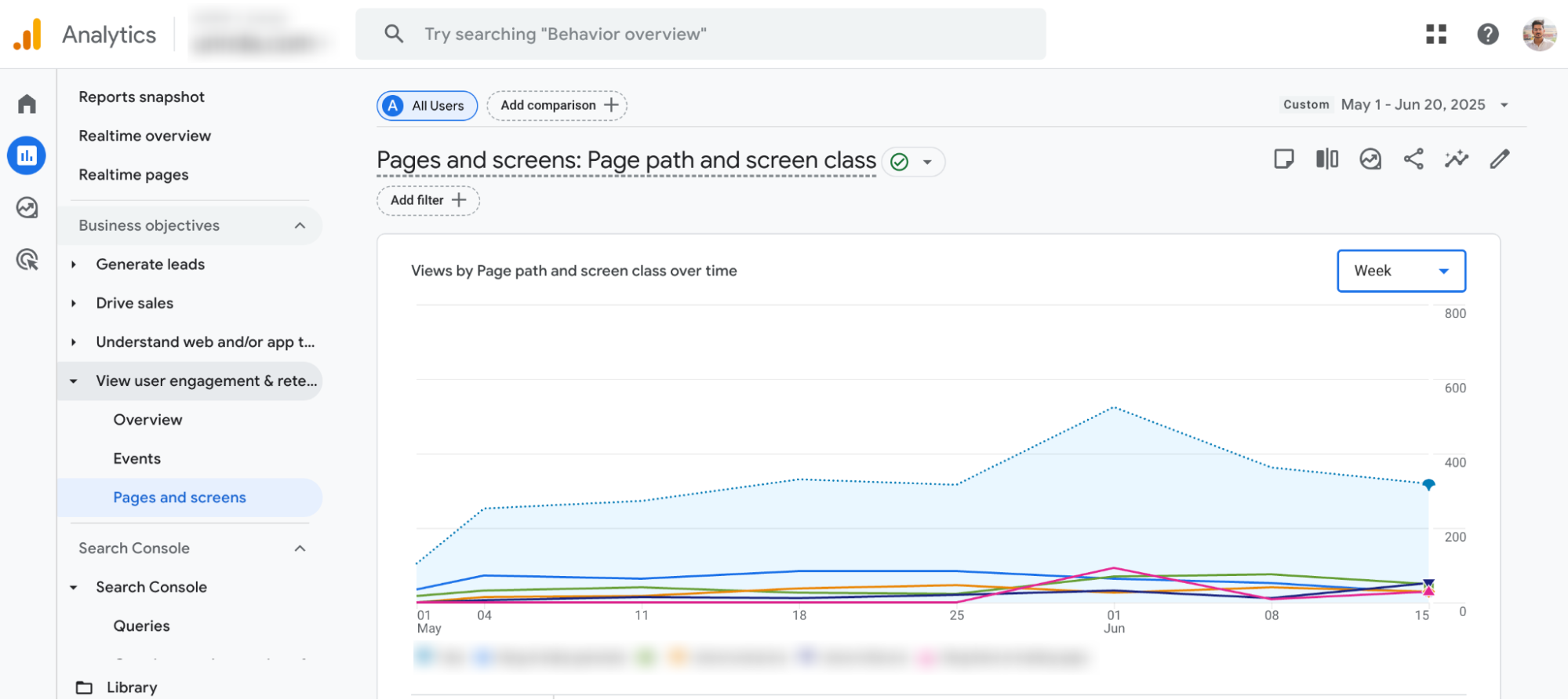
Every Monday morning, I open GA4 and look at organic traffic for the past 7 days, broken down by landing page.
Why I care
Traffic alone doesn’t tell me much. But where it’s going tells me everything. If a new blog post suddenly gets 80% of organic traffic, I know it’s resonating. If a key service page drops, I jump into GSC to check for ranking or indexing issues.
How I do it
- Open GA4 > Reports > Engagement > Landing Pages
- Apply a filter for Session Source = google / organic
- Compare week-over-week or month-over-month
- Look at spikes or drops then ask why
Total clicks (Google Search Console)
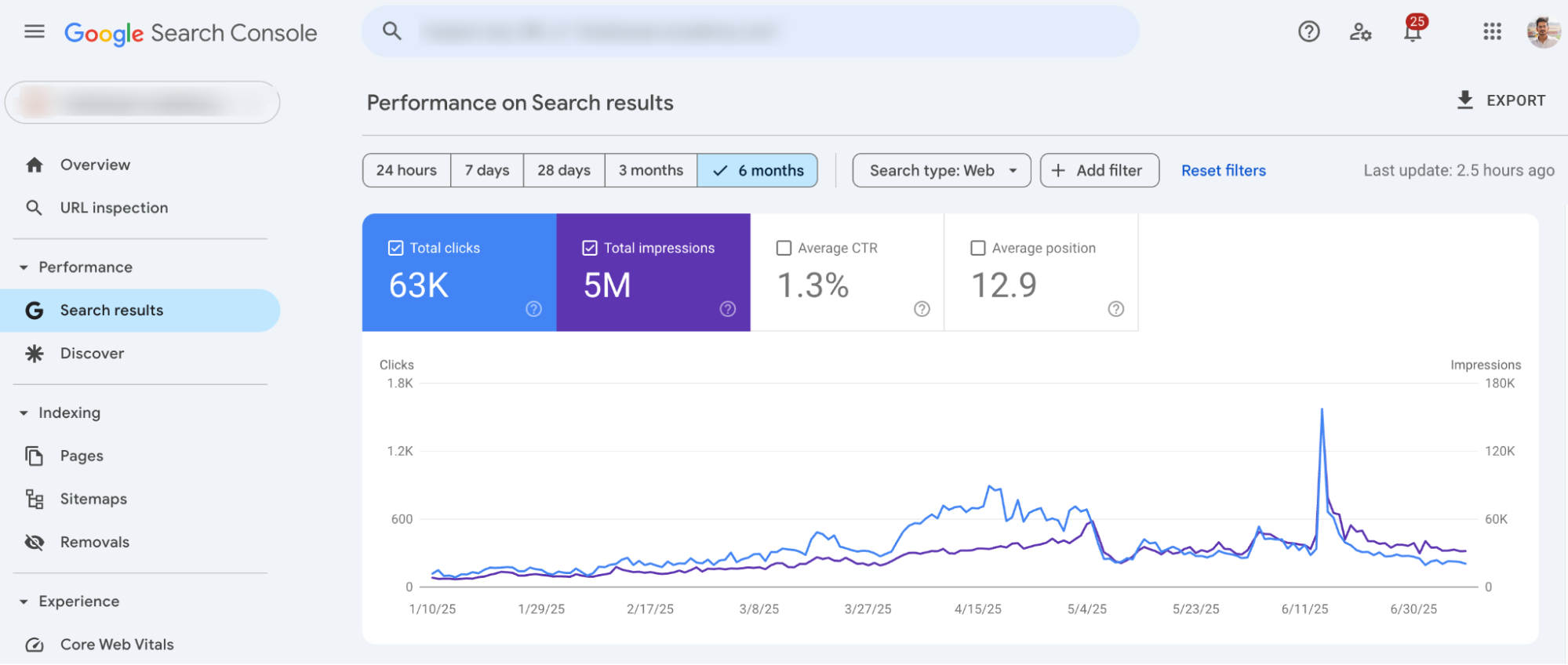
I use this to double-check what GA4 tells me. If clicks drop but impressions stay high, I know I have a CTR problem, not a ranking issue.
Why it matters
Clicks = real interest. You can get thousands of impressions, but if no one clicks, you’re just taking up space. It’s like owning a billboard on a highway no one looks at.
How I do it
- Head to Search Console > Performance > Search Results
- Filter for the past 28 days
- Compare clicks over time, and spot any dips
- Click into Pages or Queries to diagnose what’s causing the change
What I do next
- If clicks are up, I celebrate quietly with coffee.
- If clicks are down, I:
- Review CTR by query
- Rework meta titles and descriptions to be more click-worthy
- Check if there’s a SERP feature pushing us down
Sometimes, your ranking hasn’t changed but Google added a new video carousel or AI overview that drops you below the fold. Total clicks will show you the impact faster than any keyword tracker.
Search visibility (Impressions – GSC)
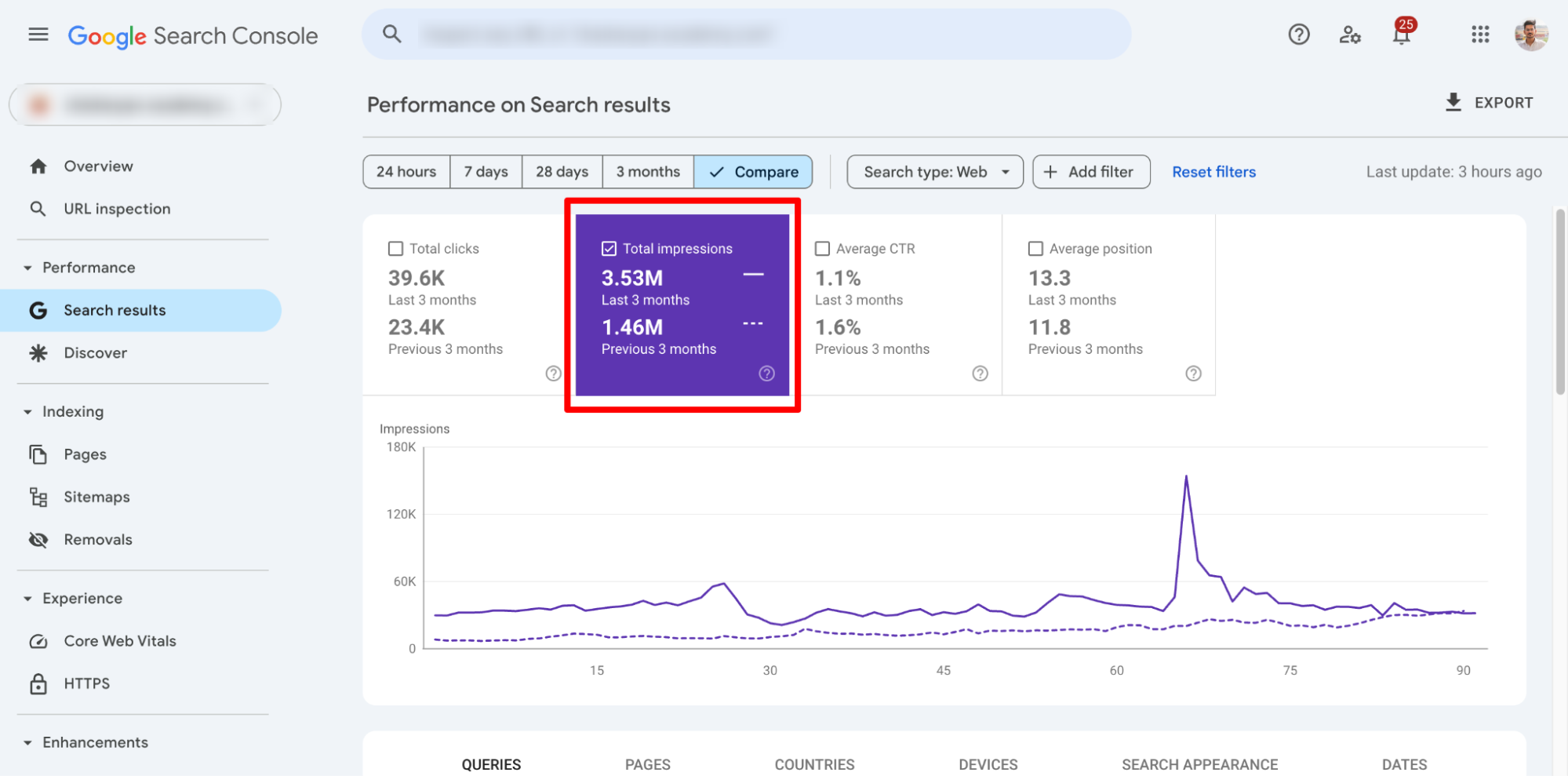
This is like watching the iceberg below the surface. Impressions tell me how often we’re showing up, even if no one’s clicking yet.
Why I use it
It helps me detect growth early. If I see impressions trending up for a set of new blogs even before clicks or rankings move then I know we’re heading in the right direction.
How I do it
- GSC > Search Results > Filter by past 3 months
- Sort queries or pages by Impressions
- Use the “Compare” view to see if impressions are rising
What I look for
- Sudden spikes → Check if we’re ranking for a new topic or keyword cluster
- Steady rise across blog posts → My internal linking or content clustering is working
- Flatline → Could be indexation issues, or content that’s not aligned with search intent
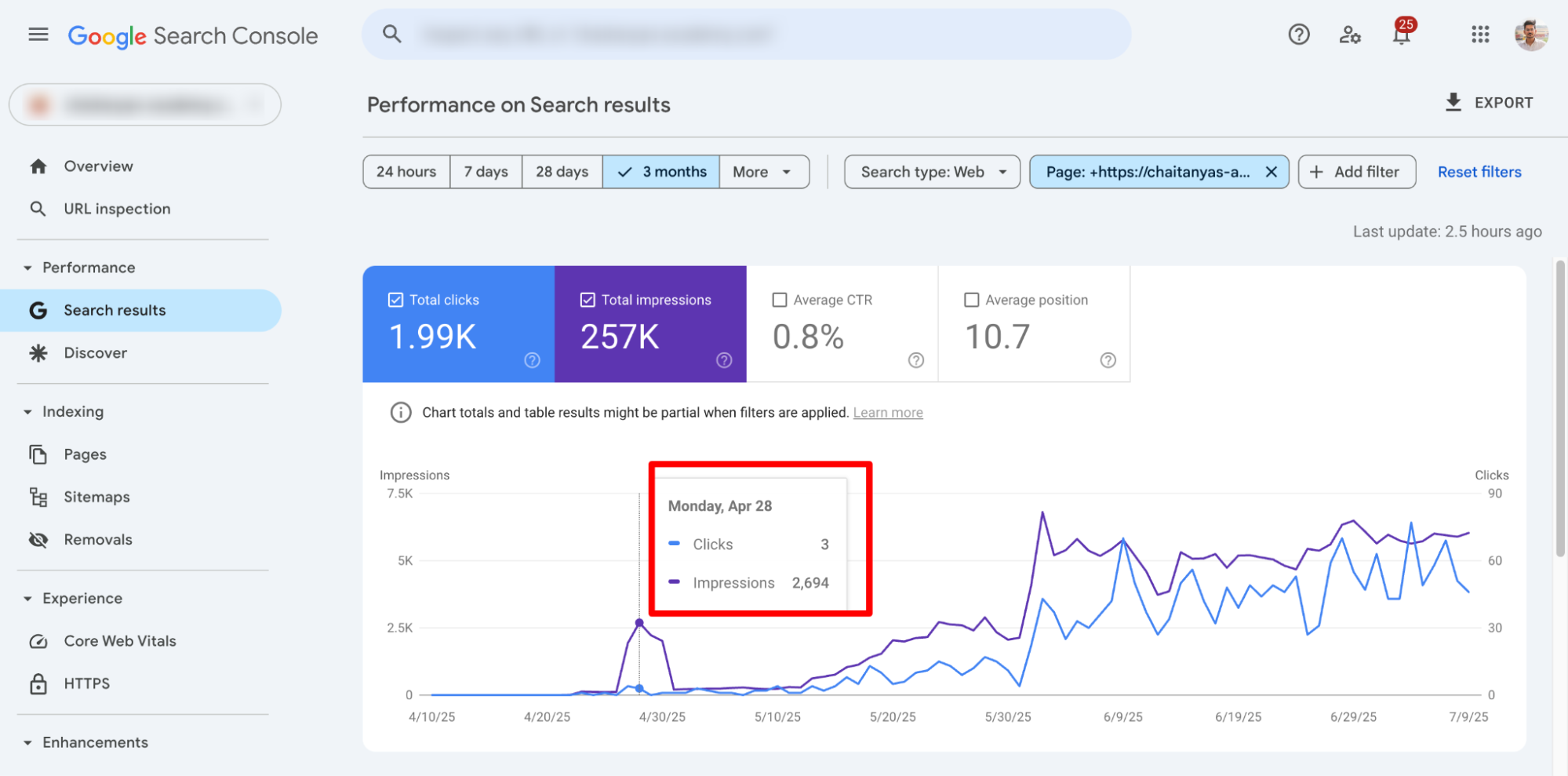
I once wrote a blog on “IIT colleges in India” that got zero clicks for almost a month but 2,000+ impressions. That showed me the demand was there. I optimized the meta title, added schema, and updated internal links. Next month? 30 clicks and climbing.
Click-through rate (CTR) by page and query

I look at CTR in Google Search Console per page and per query. It tells me: are people actually clicking when they see us in search results?
Why this matters
You can be ranking #3 and still get trash traffic if no one’s clicking. On the flip side, I’ve seen pages in position #6 outperform #3 just because of a better title and meta description. CTR is the first sign that your page is interesting enough to get attention.
How I do it
- Open GSC > Search Results
- Check the CTR column alongside Impressions and Position
- Click into Pages → Pick a page with decent impressions
- Then click Queries to see which search terms are underperforming
What I do next
- If I see CTR below 1% and impressions are high → I rewrite the title/meta
- If CTR is high but impressions are low → I try to improve rankings with internal links or content updates
- If CTR drops suddenly → I check if Google added a featured snippet or competitors changed their titles
My go-to title formula
- Use numbers (“5 things I wish I knew about…”)
- Add emotional hooks (“without wasting money” or “before you regret it”)
- Make it look like a solution (“How I fixed XYZ without doing ABC”)
Let me share some of mine with you
👉 SEO Trends You Must Watch Out For in 2025
👉 Best AI Trip Planner Apps for Your Joyful Travel Experience
👉 My Favorite AI Apps for Android to Make Everyday Life Easy
SERP feature ownership
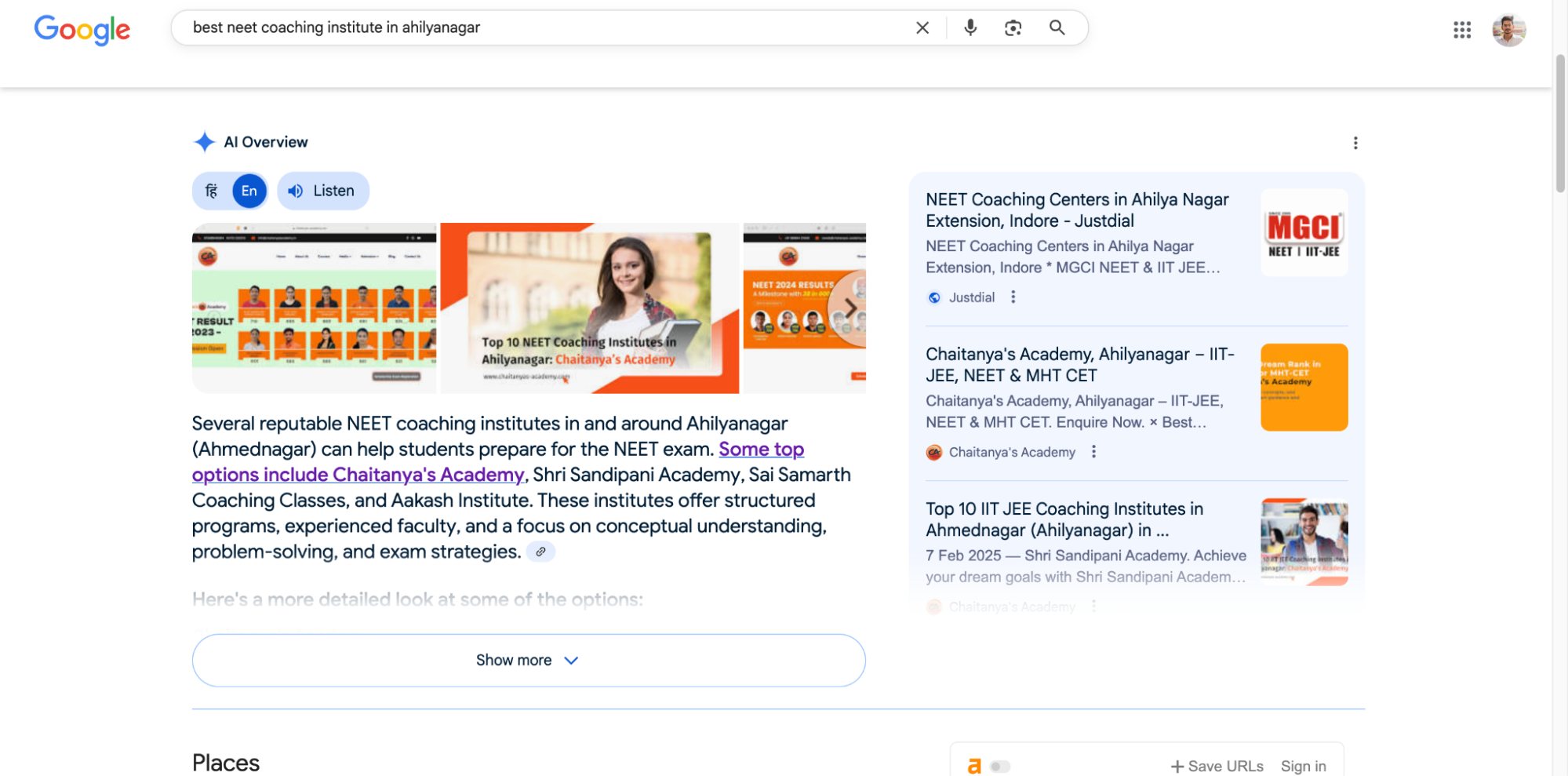
With SERP feature SEO metric, I want to know if I’m owning featured snippets, “People Also Ask,” video thumbnails, FAQs, or image packs.
Why I care
Sometimes you don’t need position #1 to win, if you snag a featured snippet, you’re practically stealing attention from everyone above and below. SERP features are like bonus real estate in Google.
How I check it
- Ahrefs > Organic Keywords > SERP Features filter
- Or just Google my target queries manually in incognito mode
- I also use GSC > Performance > Search Appearance to see feature clicks (FAQ, video, etc.)
What I do to win them
For featured snippets:
- Use clear subheadings (H2 or preferably H3)
- Answer the question in 40–60 words
- Add definition-style sentences early (“X is a…”)
For FAQs:
- Add FAQ schema using a plugin (like Yoast or RankMath)
- Write real Q&A-style sections at the bottom of pages
For videos/images:
- Add proper alt text
- Use descriptive filenames
- Host fast-loading videos or embed YouTube with schema
Share of voice (SOV)
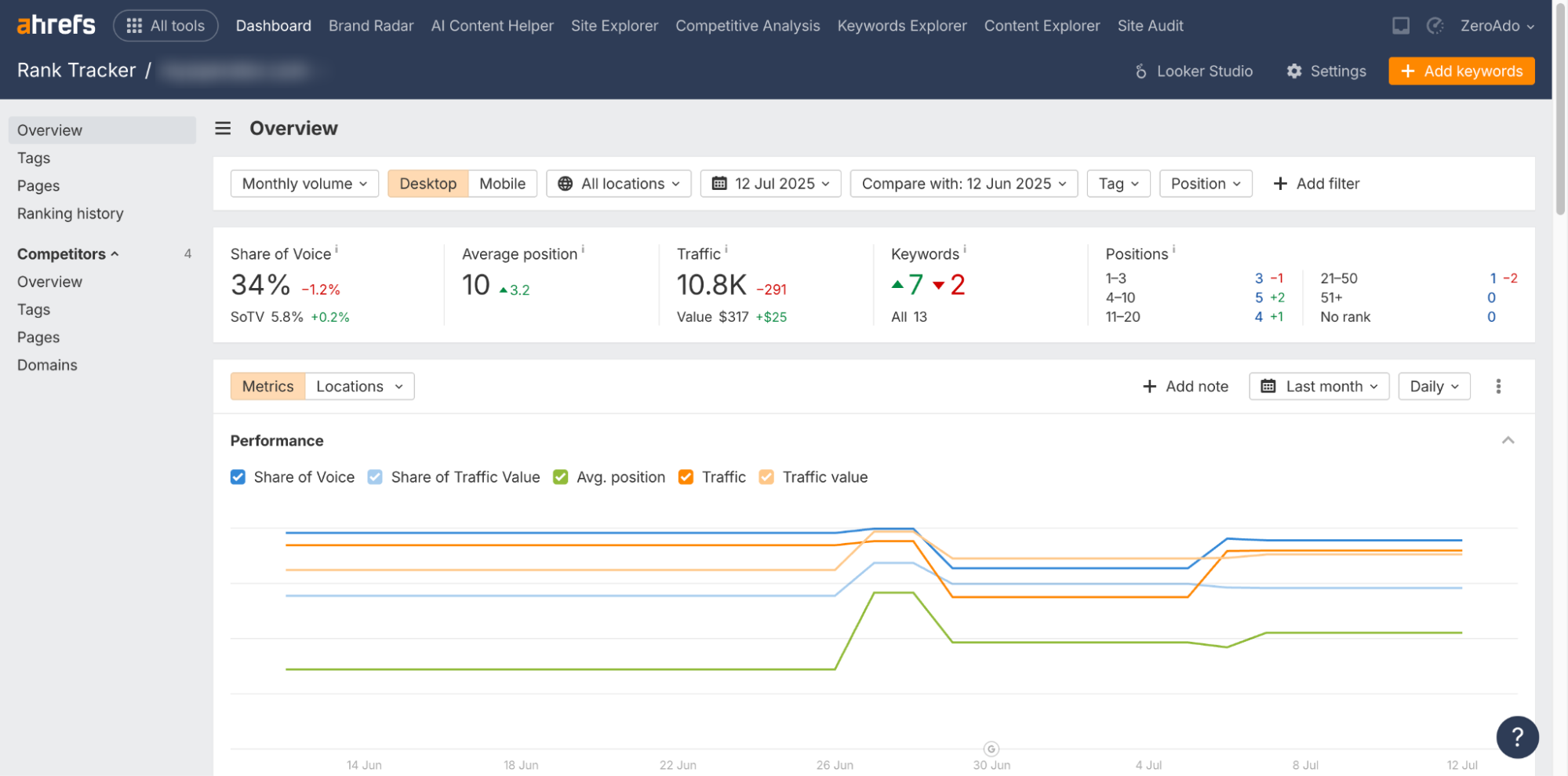
Now this is something that you probably have not heard of, but I use this.
SOV tells me how much visibility my site has compared to competitors, usually for a topic or group of keywords. It’s like asking: “Of all the people searching for a particular keyword, how many are seeing us?”
Why it works
I use SOV when I want to dominate a niche or cluster like “AI tools for travel planning” or “B2B SEO agencies.” Rankings are great, but if you’re only showing up for 10% of the topic’s potential, you’re leaving growth on the table.
How I measure it
- Ahrefs > Rank Tracker > Create a tag group (e.g., “B2B SEO agencies blog keywords”)
- Look for Visibility % or Share of Voice
- Set alerts for drops or gains
What I do with the info
- If I see a competitor gaining SOV → I audit their content
- If our SOV is under 20% for a cluster → I write more supporting content, build internal links
- If it’s 50%+ → I focus on protecting that turf by updating top pages
SOV isn’t for everyone. It’s more useful when you’re doing topic cluster SEO and content marketing or working in a competitive space. For small sites, it’s helpful, but I wouldn’t obsess over it early on.
Keyword rankings by topic and intent

To be honest, I don’t just track keywords blindly. I group them by intent like “informational,” “comparison,” or “buy now” and by topic clusters. It gives me a clearer view of what content is doing well and where I need to fill the gaps.
Why it matters
Ranking for a keyword is nice, but ranking for a full intent journey? That’s when SEO turns into leads and sales. It also keeps me from chasing irrelevant terms just because they have a high search volume.
How I do it
- Use Ahrefs Rank Tracker or Semrush Position Tracking
- Group keywords under tags like:
- Blog: Awareness
- Service pages: Transactional
- Product category: Comparison
- Track changes weekly or monthly
- Spot which clusters are improving and which ones are stagnant
What I do next
- If informational content ranks well but doesn’t convert → I add CTAs, Pop-ups, or lead magnets
- If transactional keywords drop → I check technical SEO, page UX, and internal links
- If a keyword is stuck at position #11 → I rewrite the intro, add FAQs, build 2–3 internal links pointing to it

I worked with a SaaS brand where we ranked in the top 3 position for “WhatsApp API provider” but didn’t rank at all for “WhatsApp business API providers.” We built a blog over this, linked it from the blog, and within a month, it ranked #3 and started pulling in actual signups.
Content decay detection

I look for blog posts or pages that used to rank well but have slowly lost traffic over 3–6 months. I call this “content rot,” and it happens even to your best pieces.
Why this matters
Some of my top-performing posts in 2023 and 2024 slowly died because I forgot to update them. If you’re not refreshing, you’re leaving rankings and revenue on the table.
How I do it
- Open GA4 or Ahrefs > Top Pages
- Sort by traffic decline over last 3–6 months
- Export into Google Sheets
- Add a column: “Last updated?”
→ If it’s 6+ months old and traffic is down → I mark it for a refresh
What I do next
- Re-check the keyword intent (maybe the SERP changed)
- Add new data, stats, screenshots
- Improve formatting (add subheadings, bullets, FAQs)
- Add internal links from newer page
Even changing the publish date (once you actually update the content) can trigger reindexing. I’ve seen decayed posts jump back to top 5 rankings within days just from a quality refresh.
Top conversion pages from organic
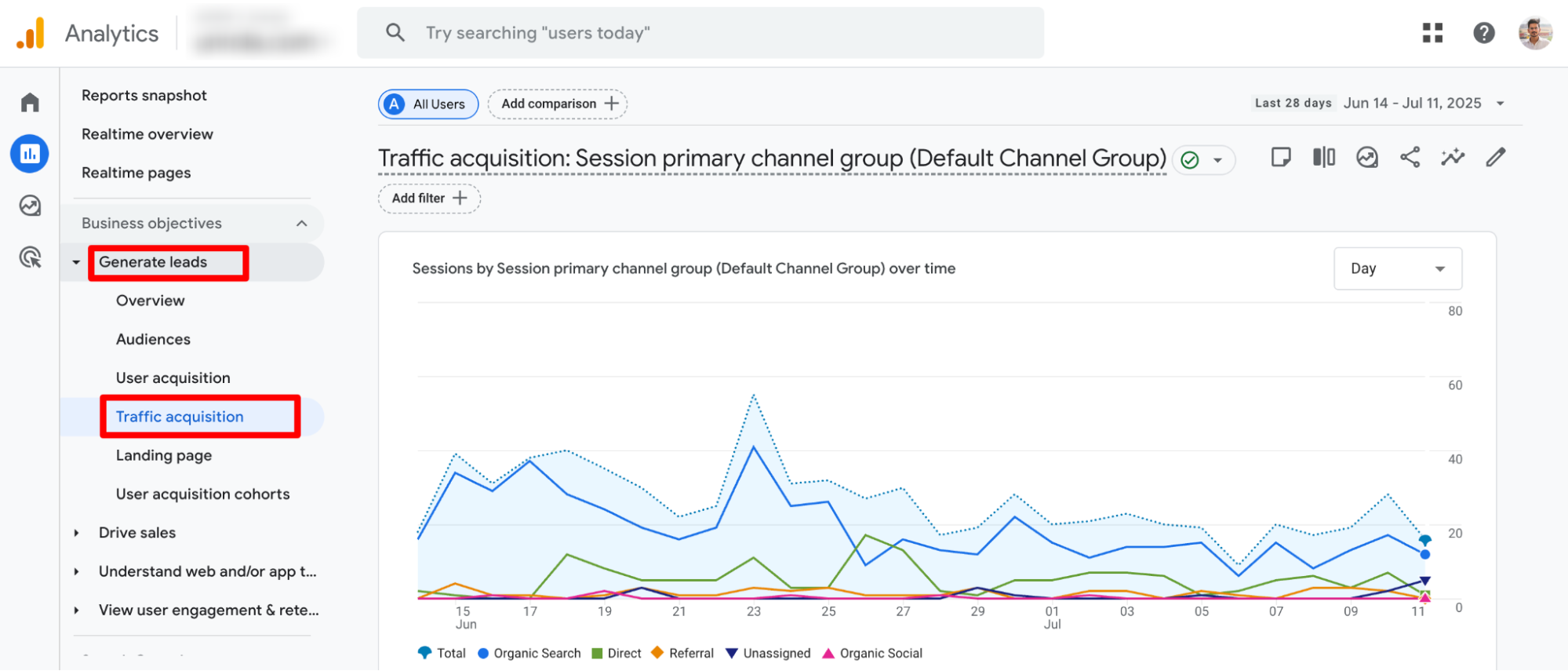
This is where I get serious about ROI. I look at which pages bring in the most conversions from organic traffic whether that’s form fills, purchases, or email signups.
Why this matters
You might be getting traffic to one page, but conversions from another. This shows me which content is actually pulling its weight.
How I do it
- Open GA4 > Generate Leads > Traffic Acquisition
- Filter by Session Source: google / organic
- Add Landing Page as a secondary dimension
- Sort by Conversions (or custom events)
What I do next
- Pages with high traffic but low conversions → Add stronger CTAs, pop-ups, or lead magnets
- Pages with high conversions → Link to them more internally, run small A/B tests to improve even further
- Use those top pages to build topic clusters around them
For one client, we discovered a blog titled “Call Center Companies in Gurgaon” had a crazy high lead conversion rate. We turned it into a lead magnet funnel, promoted it via internal links, and it started bringing in 30% of the site’s MQLs (marketing qualified leads). The blog stayed mostly the same, we just made it easier to take action.
Indexed pages (GSC)

With indexed pages, I want to know how many of my pages Google is actually indexing, and if it’s missing any that matter.
Why this matters
If Google isn’t indexing a key page, it might as well not exist. This often happens when there are crawl budget issues, technical errors, or duplicate content signals.
How I do it
- Head to GSC > Pages > Indexing
- Look at “Indexed” vs “Excluded”
- Review exclusions like:
- “Crawled – currently not indexed”
- “Duplicate without user-selected canonical”
- “Discovered – currently not indexed”
What I do when stuff’s not indexed
- For thin pages → I bulk noindex or merge them
- For important pages → I fetch and submit them manually using “Inspect URL”
- I also check internal links → if a page has 0 internal links, Google might skip it
Pro tip
You can also check site-wide index coverage with Screaming Frog + GSC integration. That’s how I SEO audit large sites with 500+ pages quickly.
Internal linking depth
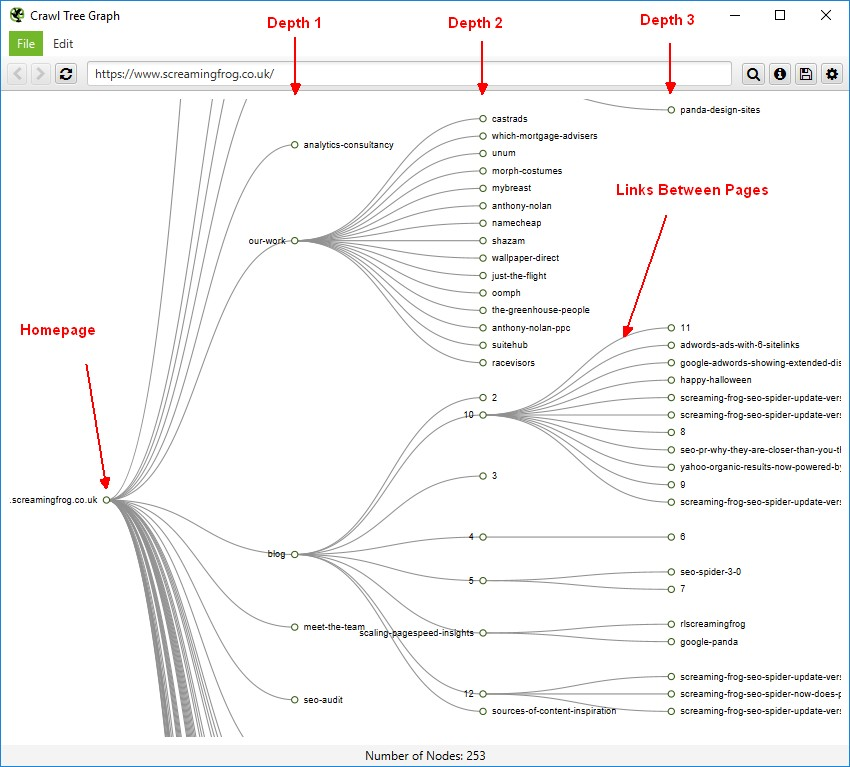
This is something I’ve noticed many SEOs tend to overlook.
Here I check how deep important pages are buried in the site structure. If a key blog post or product page is more than 3 clicks away from the homepage, I flag it.
Why this matters
Google crawls pages through links. If it takes a search bot (or a user) 5 clicks to reach a page, that page is probably getting ignored. Plus, internal links pass authority, so if you don’t link into your best content, it doesn’t perform.
How I check it
- Screaming Frog > Site Structure > Crawl Depth
- Sort pages by crawl depth
- Flag anything important that’s 4+ clicks deep
What I do next
- Add internal links from high-traffic pages to important low-traffic ones
- Include sidebar or footer links for evergreen content
- Update nav menus if a product/service deserves more visibility
Referring domains (backlink quality)

Instead of obsessing over total backlinks, I focus on referring domains, especially new, high-quality ones. A single link from a site like HubSpot or Forbes beats 100 spammy blog comments.
Why this matters
Google still sees SEO backlinks as votes of trust. But not all votes are equal. One good domain in your niche is worth more than dozens from low-quality sites.
How I track it
- Ahrefs > Backlink Profile > Referring Domains
- Sort by Domain Rating (DR)
- Check new/lost links every 2 weeks
What I do next
- For good new links → I build relationships or find ways to turn one link into two (guest post, partner content, etc.)
- For lost links → I check why (page deleted? URL changed?) and try to reclaim it
- For spammy links → I usually ignore unless it’s a massive spike, then I disavow via GSC
We published a “Beginner’s Guide to CSaaS” for a B2B client. It got picked up organically by 3 customer support blogs. I emailed one editor with a follow-up article idea and landed 2 more high-authority backlinks from their another blog post and resource hub.
Pro tip: Another way to accelerate your backlink growth is by working with professional backlink building agencies that specialize in creating high-quality, contextual backlinks for SaaS brands.
At ZeroAdo, our team tracks these referring domains closely as part of our broader SEO campaigns. We don’t just build links, we monitor authority shifts, traffic patterns, and ranking improvements across every project. That’s the advantage of choosing a full-stack partner offering SEO services in India, you get data-backed strategies that tie link building, content, and technical SEO together for real growth.
Traffic value (Ahrefs or Semrush)
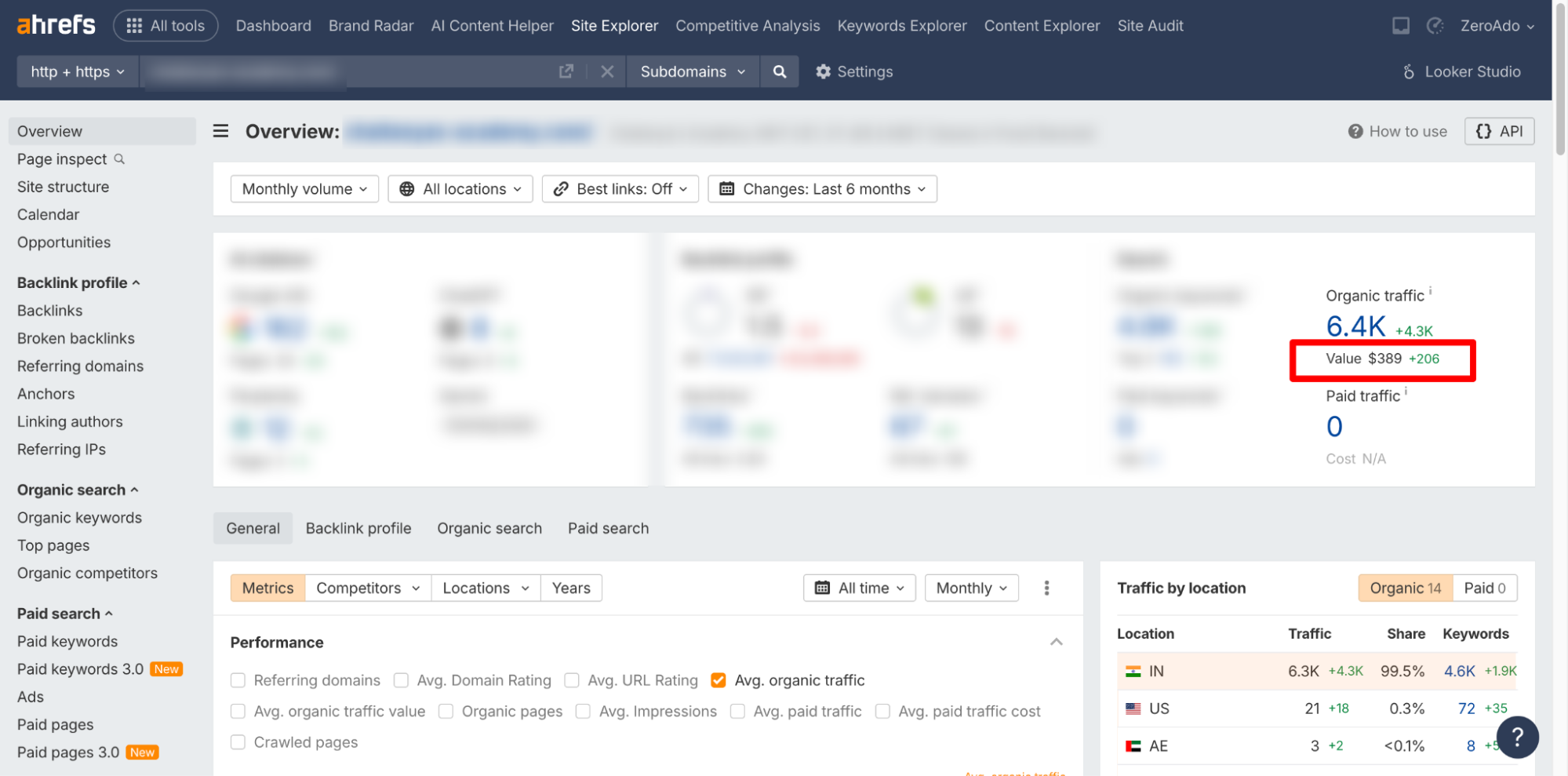
This metric estimates how much my organic traffic would cost if I were paying for it via Google Ads. I use it as a dollar-based measure of SEO performance.
Why it’s helpful
Sometimes clients don’t feel the SEO progress. But when I show them, “This traffic would’ve cost $6,400/month to buy,” their eyes open. It reframes SEO as a revenue-saving channel, not just a content expense.
How I check it
- Ahrefs > Site Explorer > Organic Traffic > Traffic Value
- Sort by top pages → See which pages drive the most “savings”
What I do next
- If one page has high value → I protect it with fresh content, links, and technical fixes
- If I want to improve value → I focus on bottom-of-funnel keywords with CPC value
A SaaS client’s “free vs paid CRM tools” blog generated ~2K visits/mo. Ahrefs showed a traffic value of $1400/month. That one blog justified our full SEO retainer.
Related: Best SaaS SEO Agencies Who Grow Organic Traffic & Leads
Revenue or goal completions from organic (GA4)
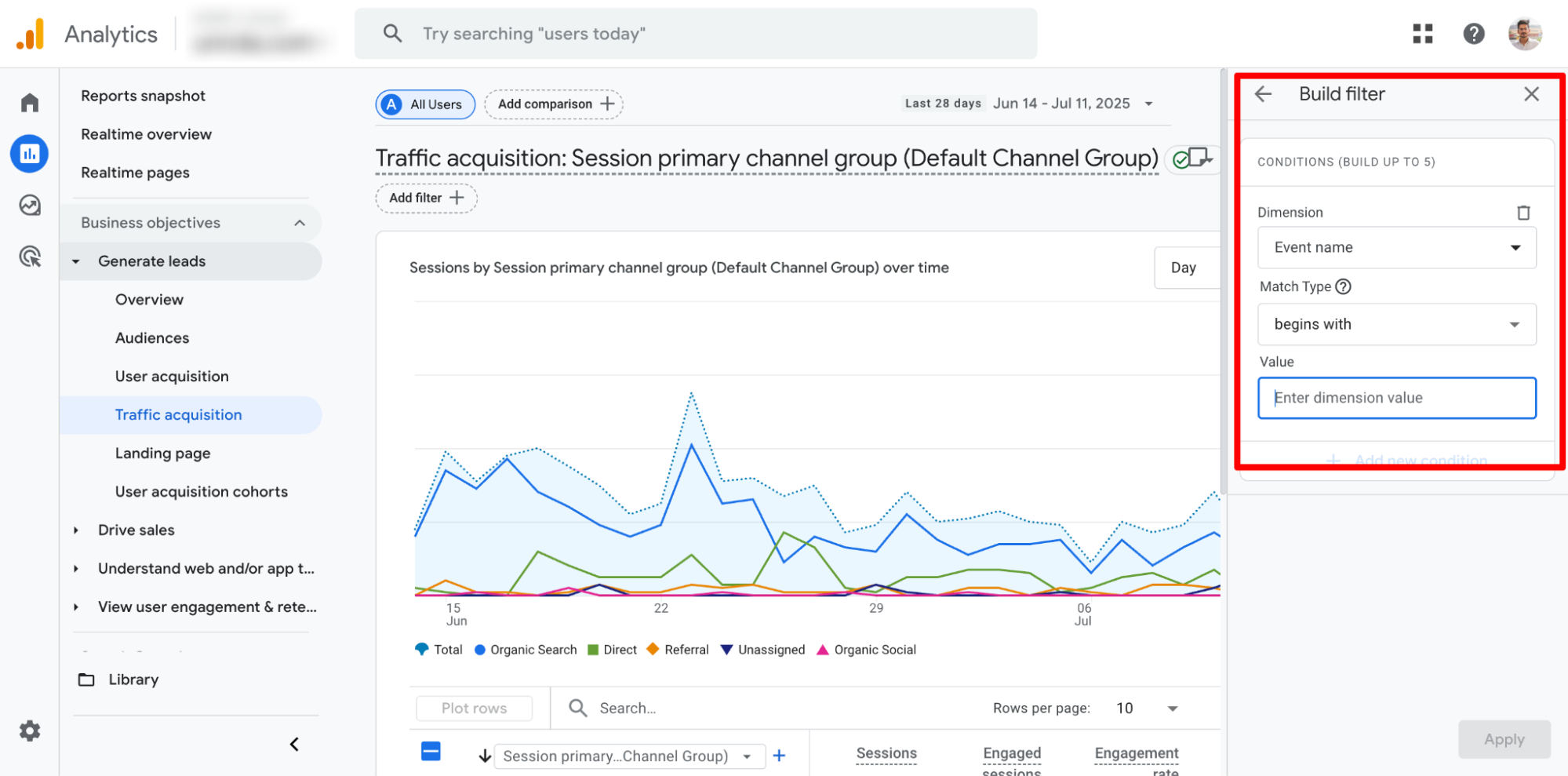
If a site is selling something or capturing leads, I want to know exactly how much is coming from Google Search. Traffic is nice. Revenue is proof.
Why I care
I don’t just want visitors, I want buyers, signups, leads. And if SEO isn’t contributing to that, something’s broken. Because I firmly believe that if traffic isn’t driving revenue, then it’s just a vanity metric.
How I do it (for lead-gen sites)
- GA4 > Conversions > Select your key event (e.g., form fill, button click)
- Filter by Session Source: google / organic
- Track over time and map back to landing pages
For eCommerce
- Use Monetization > Ecommerce purchases > Source/Medium
- Filter by google / organic
What I do next
- High traffic, low conversions → Check CTA placement and page intent mismatch
- High conversions → Use those pages as templates for future content
- I also sometimes run heatmaps (Hotjar) on top-performing pages to improve them further
For a Yoga site, we saw 60% of customer inquiry came from just 5 pages. We added sticky CTAs, improved mobile UX, and revenue from organic jumped 35% in 6 weeks.
Qualified leads from organic (MQLs & SQLs)
Beyond form submissions, I want to know how many leads were actually good. That’s where MQL (Marketing Qualified Leads) and SQL (Sales Qualified Leads) tracking comes in.
Why it matters
SEO that attracts the wrong people is just as bad as no SEO. If I’m pulling traffic that sales rejects, we’ve got an intent mismatch.
How I track it
- Use hidden fields on lead forms to capture Source/Medium
- Sync to CRM (like HubSpot, Zoho, or Pipedrive)
- Tag leads as MQLs or SQLs based on behavior or manual review
What I do next
- If organic leads aren’t converting → Check the keywords that brought them
- If MQLs aren’t converting to paying customers → I suggest clients track their sales process
- If we’re getting quality SQLs → I scale content around those intent keywords
Conversion rate from organic

This is the percentage of people who land on your site from organic search and actually do something valuable like fill a form, sign up, or buy something.
Why this matters
If you’re getting 10,000 visits from Google but zero leads, that’s not SEO working, that’s SEO leaking. I track this to spot when we’re attracting traffic that doesn’t convert or when we need to improve the page experience.
How I check it
- Go to GA4 > Reports > Traffic Acquisition
- Filter by Session Source = google / organic
- Look at Conversion Rate for your key event (or multiple events)
What I do next
- If conversion rate is below 0.5% on high-traffic pages → I analyze intent: is the page attracting info-seekers or buyers?
- I A/B test Pop-ups and CTAs (buttons vs forms, short vs long)
- I experiment with lead magnets (free guides, calculators, email courses)
One of our most client posts “Best NEET coaching institutes in India” was getting 1K+ monthly visitors but almost no enquiry. We added a visual CTA mid-post (“Get you free counceling”), made it mobile-first, and conversions jumped from 0.3% to 1.6%.
Core web vitals (INP in 2026)
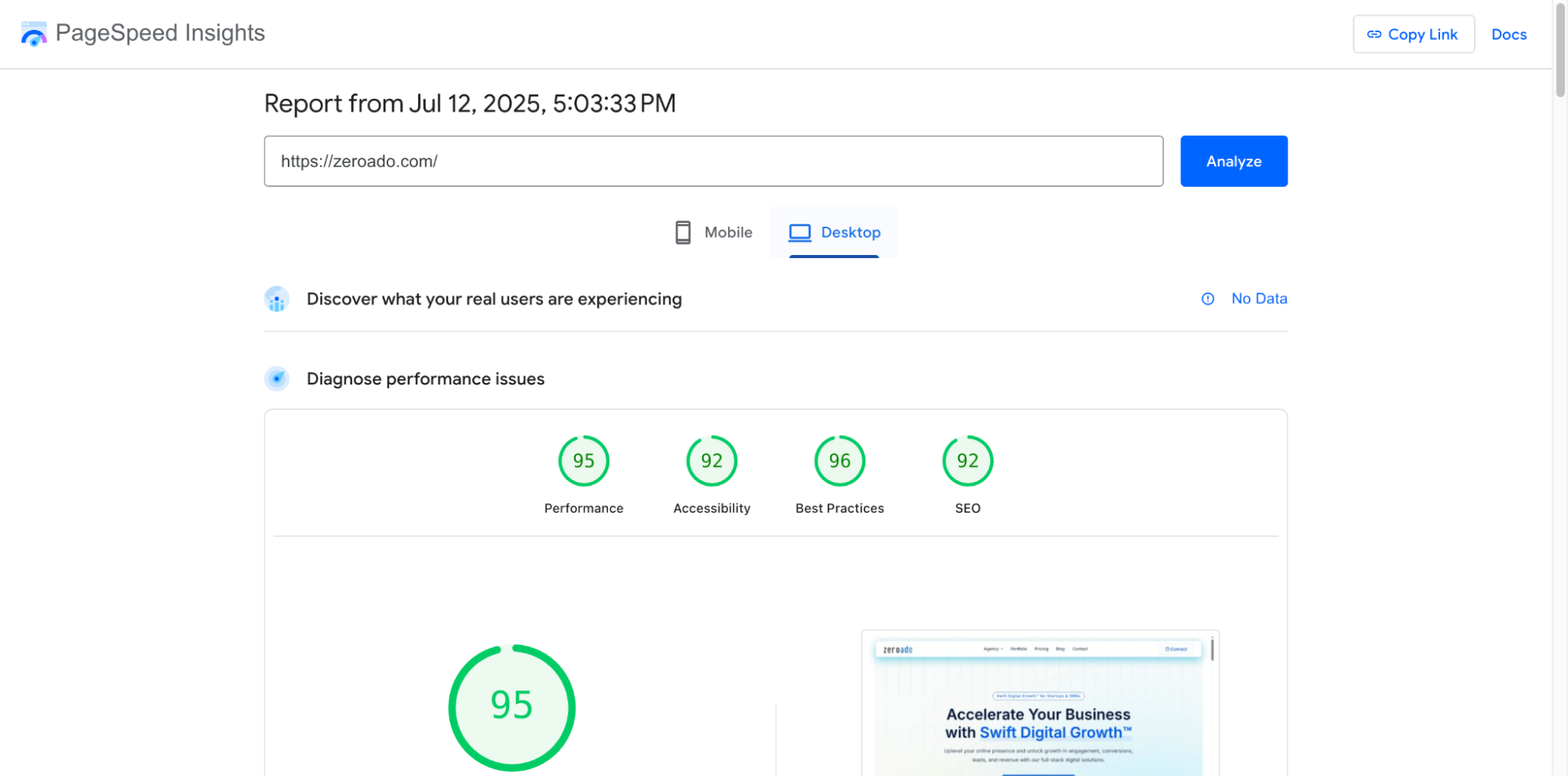
Core Web Vitals are Google’s way of saying, “Make your site fast and user-friendly.” In 2026, INP (Interaction to Next Paint) replaced FID (First Input Delay) as a key metric.
Why I care
A slow, janky site kills conversions and rankings. I track INP, LCP (Largest Contentful Paint), and CLS (Cumulative Layout Shift) monthly, especially after dev changes.
How I check it
- Use PageSpeed Insights or Search Console > Core Web Vitals
- Focus on:
- INP: Should be under 200ms
- LCP: Under 2.5s
- CLS: Under 0.1
What I do next
- Poor INP? → I delay third-party scripts (chatbots, trackers), or lazy-load non-critical JS
- Poor LCP? → I compress hero images or preload fonts
- Bad CLS? → I fix shifting headers, ad placements, or layout bugs
Index coverage errors (GSC)
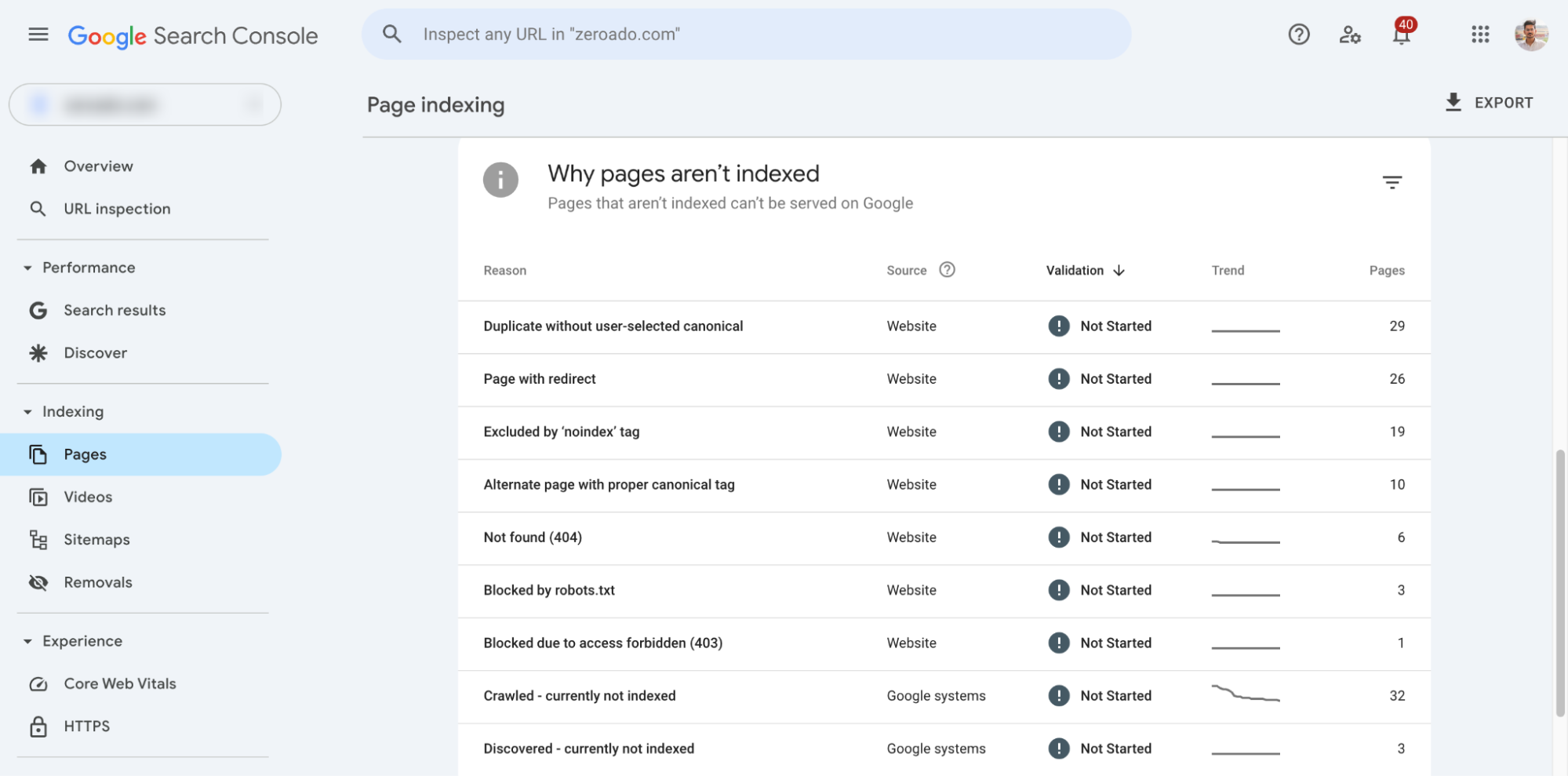
I check if Google is indexing the pages I care about and skipping the junk. Errors here often show problems you wouldn’t spot otherwise.
Why this matters
If your best blog post is marked “Crawled – currently not indexed,” it’s basically invisible. I track these weekly, especially after big content uploads or site structure changes.
How I check it
- GSC > Pages > Why Pages Aren’t Indexed
- Look at:
- Discovered – currently not indexed
- Duplicate without user-selected canonical
- Excluded by noindex
- Click into affected URLs and use “Inspect” tool
What I do next
- For critical pages → Submit manually for reindexing
- For thin/duplicate pages → Consolidate or delete
- For large-scale issues → Revisit sitemap.xml, robots.txt, or internal link structure
A client had 120+ blog posts in WordPress, but only 64 were indexed. Turned out half had no internal links. We added contextual links from top pages, fixed thin content, and got 90% indexed in 3 weeks.
Crawlability and indexation health
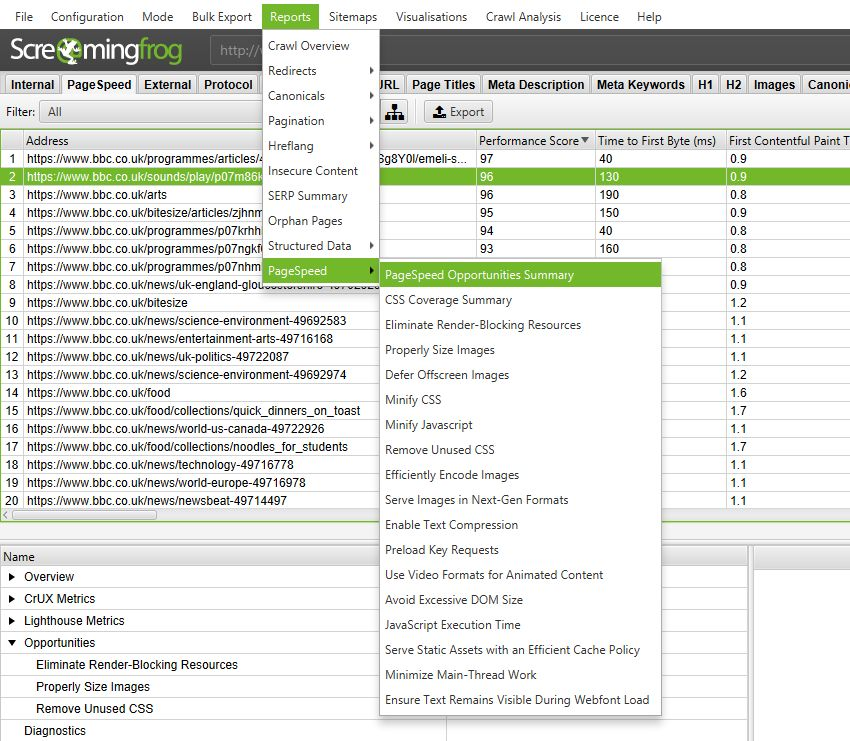
This is my “site health check”. I use it to find broken links, orphan pages, redirect loops, bloated tag archives, basically stuff that confuses Google.
Why this matters
If search engines can’t crawl and understand your site, they won’t rank it well. Simple as that. I run a full audit every month for client sites.
How I do it
- Run Screaming Frog or Sitebulb
- Look for:
- Broken links (404s)
- Duplicate titles/meta
- Orphan pages (no internal links)
- Non-indexed key pages
- Redirect chains or loops
What I fix
- Add internal links to orphan pages
- Fix 404s or redirect them
- Merge or delete duplicate/thin pages
- Submit XML sitemap again if new structure launched
One B2B site had a “Resources” section with 38 articles, but they were only linked from the footer. I added internal links from the homepage, priority blogs, and services pages.
Result? Indexation up, rankings up, and leads from those pages started rolling in.
Bonus from ZeroAdo – AI visibility and traffic (ChatGPT referrals in GA4)

This is a new one on my radar, but it’s becoming more relevant fast.
In GA4, you can now see referral traffic coming from ChatGPT and other AI platforms. I first noticed this while reviewing reports for one of our clients. Turns out, they were getting more qualified leads, because serious buyers are now turning to AI chatbots like ChatGPT, asking specific questions and skipping generic Google searches. That’s when I saw we were already getting visits directly from ChatGPT.
What I’m doing
- Check GA4 → Traffic Acquisition → Session source/medium.
- Look for referral sources like chat.openai.com.
- Track this month-over-month and flag any increases.
Why this matters
As more people use AI tools to ask questions, ChatGPT is becoming a discovery channel, especially if your content is optimized clearly and factually.
What I plan to do next
- Audit which pages AI is linking to.
- Structure content better (think: clear answers, FAQ schema, concise summaries).
- Keep tracking growth because this could become a key channel in the next 12 months.
SEO metrics I used to obsess over (but now mostly ignore)

Let’s be honest, when you’re new to SEO (or reporting to a boss/client), it’s tempting to lean on flashy numbers. But after years of actually building traffic that converts, I’ve learned some metrics look important… but don’t help you make better decisions.
So here’s my “SEO detox list.” These are the ones I either ignore or use with extreme caution.
Bounce rate
Bounce rate sounds scary “people are leaving the page!” but it’s deeply misleading. A visitor might find exactly what they needed (like a definition or a phone number), take action off-site, and leave. That’s still a success.
When I do use it
Only when combined with low time on page and no conversions. That’s when I dig deeper.
Pages per session
More pages = good engagement, right? Not always. Sometimes it means people can’t find what they need, so they’re clicking around in confusion.
What matters more
I care about time-to-goal, not page count. If someone converts fast, that’s a win.
Average session duration
It doesn’t count time on the last page. If a user visits one page and stays for 10 minutes but doesn’t click again, GA4 often marks that as zero seconds. So it’s wildly inaccurate, especially for blog-heavy sites.
What I’ve learned
This metric made me overthink things like “should I make the blog longer?” when the real fix was adding a better CTA or video.
What I track instead
Scroll depth (via Hotjar or GTM), lead conversions, or return visit rate.
Exit rate
Every user has to exit somewhere. Seeing a high exit rate on a blog post? That’s expected. Doesn’t mean the content failed.
Where I do watch it
- On checkout pages → if exits spike here, something’s broken.
- On thank you pages → I add CTAs to reduce drop-off or push them to the next funnel step.
Otherwise? It’s noise.
Number of backlinks (raw count)
Getting 500 backlinks from random directories or guest post farms used to work in 2012. Now? Google’s smarter. A single link from a respected domain in your niche can beat 100 no-name links.
What I track instead
- Referring domains
- Link relevance
- Link placement (in-content > footer/sidebar)
True story
A client asked, “Can we get 1,000 backlinks in a month?”
However, we said no and instead landed 3 solid ones from industry publications. Traffic and rankings improved anyway.
Afterall, quality > quantity. Always.
Final thought on metrics that don’t matter (much)
If a metric doesn’t:
- Help me make a decision
- Lead to a specific action
- Or impact conversions, visibility, or rankings
…I either skip it or demote it to “background noise.”
“Good SEO is about clarity, not dashboards.”
So, don’t be afraid to ignore what everyone else is obsessing over.
Start tracking your SEO metrics today!
Tracking SEO metrics in 2026 isn’t about chasing every shiny number. It’s about knowing what actually impacts growth and building repeatable processes around it.
My personal rule:
If a metric doesn’t help me make a decision or spot a problem, I stop tracking it.
Start simple. Pick your top 5–7 metrics. Set a weekly or monthly review habit. And don’t forget to actually do something with the insights.
If all this feels overwhelming or if you just want a second pair of eyes on your SEO performance setup, we at ZeroAdo are here to help. Whether you’re a founder, business owner, marketer, or freelancer trying to make SEO less messy and more meaningful, let’s chat.
Let’s make your SEO work smarter, not harder. 💪
